Procreate Brush Stamp Bean: Creative Potential and Common Pitfalls
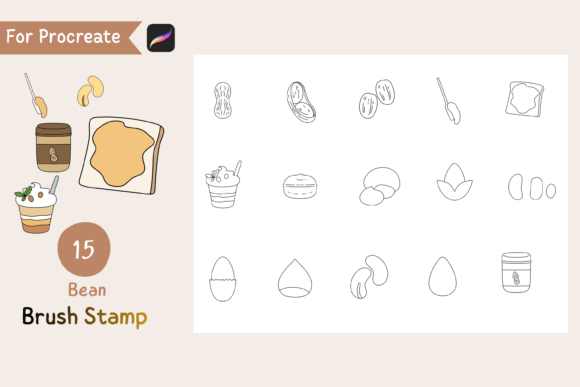
If you're exploring new ways to enhance your digital illustrations, you may have come across the Procreate Brush Stamp Bean — a set of 15 cute, handdrawn bean doodle brushes designed specifically for Procreate. These brushes offer transparent backgrounds, giving users the freedom to customize colors, textures, and patterns to fit their unique artistic vision. While the flexibility and charm of these brushes are appealing, many users — both new and experienced — can run into issues that limit their effectiveness or lead to frustration.
What Makes Procreate Brush Stamp Bean Unique?
The Procreate Brush Stamp Bean set stands out due to its whimsical design and adaptability. Each brush in the set mimics a hand-drawn bean shape, allowing artists to add playful, organic elements to their work. Because the brushes come with transparent backgrounds, you're not locked into a specific color or texture. This feature is especially useful for creators who want to maintain a cohesive visual style across multiple projects without being limited by pre-applied effects.
Common Mistakes When Using Procreate Brush Stamp Bean
Despite its flexibility, users often make choices that hinder their creative flow or diminish the quality of their work. Here are some common missteps and how to avoid them:
Mistake 1: Overlooking File Compatibility
One of the first issues users encounter is not being able to properly install or use the .brushset file. While the set comes in a zip file containing all necessary files, some users attempt to open the contents directly without understanding how Procreate handles brush imports. This can lead to confusion and wasted time.
- Better approach: Always ensure you're using the latest version of Procreate. To install, simply tap the .brushset file after downloading — it should open directly in the app and add the brushes to your library.
Mistake 2: Ignoring Brush Settings
Many users assume that because the brushes are handdrawn and cute, they’ll work perfectly right out of the box. However, each brush can behave differently depending on your stylus pressure, canvas resolution, and layer settings.
- Better approach: Take a few minutes to test each brush at different sizes and pressure levels. Adjust the opacity, blending mode, and grain settings to get the most out of each doodle style.
Mistake 3: Using Brushes Without Context
Some creators drop the bean doodles into their work without considering composition or visual harmony. The result can look cluttered or mismatched, especially if the style doesn't align with the rest of the illustration.
- Better approach: Think about how the beans will interact with other elements. Use them to accentuate or guide the viewer’s eye, rather than filling space without purpose.
Mistake 4: Misjudging Transparency Effects
Because the brushes have transparent backgrounds, users sometimes expect them to blend seamlessly with any background. In reality, improper layer blending or color choices can cause unexpected visual issues.
- Better approach: Always preview your brush stamp on different background colors or textures before finalizing. If needed, apply a subtle drop shadow or outline to ensure visibility.
What to Check Before Downloading or Using Procreate Brush Stamp Bean
Before you commit to using this brush set, take a moment to verify a few key details that can affect your experience:
- Procreate version: Confirm that your app is updated to support custom brushes. Older versions may not recognize the .brushset format.
- Device compatibility: Ensure your iPad and stylus are calibrated correctly to take full advantage of pressure sensitivity and tilt features.
- License and usage rights: Make sure the brush set allows for both personal and commercial use if you plan to incorporate it into client work or products.
- File integrity: Double-check that the zip file includes all promised assets and that no files are corrupted or missing.
Maximizing the Value of Procreate Brush Stamp Bean
These brushes are more than just decorative tools — they’re opportunities to add character and warmth to your digital creations. To get the most out of them:
- Create a cohesive visual language: Use the bean brushes to reinforce a theme or narrative in your design, such as nature, playfulness, or minimalism.
- Combine with other brushes: Layer the bean doodles with textures, gradients, or solid fills to enhance depth and interest.
- Customize beyond color: Experiment with filters, blending modes, and animation features in Procreate to breathe life into static illustrations.
Final Thoughts
The Procreate Brush Stamp Bean offers a fun and flexible way to inject personality into your digital art. By avoiding common pitfalls and taking time to understand how each brush behaves, you'll unlock more creative freedom and efficiency. Whether you're a hobbyist, educator, or professional designer, these handdrawn doodles can become a valuable part of your toolkit — as long as you approach them with a bit of preparation and intention.