Enhancing Design Projects with Decorative Borders Pack 3
A Versatile Addition to Your Creative Toolkit
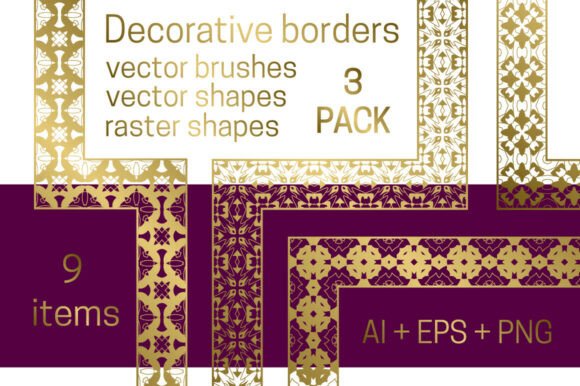
Decorative Borders Pack 3 is the latest installment in a series of design resources tailored for professionals and creatives who need polished, adaptable visual elements. This pack builds on the strengths of its predecessors by offering a refined selection of nine decorative border designs. Whether you're working on print layouts, digital illustrations, or branding materials, these borders provide a consistent and elegant way to frame and separate content.
What sets this pack apart is its thoughtful organization and compatibility across Adobe Illustrator versions. Users of both AI CC and AI CS6 can access vector borders directly from the brush panel, streamlining the integration process. For those using other design software, the pack includes shape files that can be converted into custom brushes, ensuring flexibility regardless of your preferred platform.
Contents and File Structure
The archive is neatly arranged to make navigation straightforward. The brushes_CC.ai and brushes_CS6.ai files allow Illustrator users to apply borders seamlessly within their workflow. The shapes.eps file offers reusable vector elements ideal for creating repeating patterns or adapting to different layout needs.
In addition to vector assets, the collection includes bonus1.eps and bonus2.eps—each featuring nine golden frames in round and square formats. These bonus frames serve as standalone decorative elements or complementary accents to the main border designs. The pack also includes eighteen PNG files with transparent backgrounds, available in black and gold tones for quick integration into layered compositions.
Design Quality and Aesthetic Appeal
Each of the nine core borders in Decorative Borders Pack 3 exhibits a high level of craftsmanship. The lines are clean, the patterns are symmetrical, and the overall aesthetic strikes a balance between ornate and functional. The gold-toned PNGs, in particular, offer a refined finish suitable for luxury branding, invitations, or editorial design.
The vector files maintain their clarity at any scale, which is essential for both print and digital applications. This scalability ensures that borders used in a small social media graphic or a large-format poster retain their visual integrity without pixelation or distortion.
Practical Use Cases
Professionals across various fields will find Decorative Borders Pack 3 beneficial. Graphic designers working on magazine layouts or packaging can use these borders to define sections or highlight key elements. Web designers may incorporate the PNG files into website headers, dividers, or promotional banners. Educators and publishers can enhance presentations and printed materials with visually structured frames.
- Branding and Marketing: Gold-toned frames and borders add a premium feel to business collateral and social media templates.
- Editorial Design: The pack’s variety supports consistent styling across magazine spreads, book covers, and infographics.
- UI/UX Workflows: PNGs with transparent backgrounds integrate easily into web and app interfaces for decorative dividers.
Workflow Integration and Compatibility
One of the standout features of Decorative Borders Pack 3 is its compatibility with Adobe Illustrator. Designers using AI CC or CS6 can load the brush files directly into their workspace, making it easy to apply borders with precision and adjust them as needed. For users of other software—such as Photoshop, Affinity Designer, or Canva—the included EPS and PNG files offer viable alternatives.
The inclusion of both vector and raster formats ensures that the pack adapts to different production pipelines. Designers who prefer working with scalable vectors for flexibility can do so, while those needing quick placement options can rely on the pre-rendered PNGs.
Organization and File Management
The archive’s file structure is intuitive, which is a notable advantage for busy professionals. Each file is clearly labeled, reducing the time spent searching for the right asset. This organization helps maintain consistency across projects, especially when collaborating with team members or handing off assets to clients.
For instance, a freelance designer working on a client’s branding package can quickly access the gold frames from bonus2.eps to apply to a logo enclosure or certificate layout. Similarly, a blogger designing a custom template can use the PNG files to create visually distinct section breaks without needing to redraw elements from scratch.
Limitations and Considerations
While Decorative Borders Pack 3 is well-executed, it may not be the best fit for every project. The ornamental nature of the designs leans toward classic, elegant, or premium aesthetics. Designers working in minimalist, modern, or industrial styles may find the borders too elaborate for their needs.
Additionally, while the pack includes both vector and PNG formats, users of non-Illustrator software will need to manually create brushes from the shape files, which can be a minor inconvenience. However, this is a common limitation with multi-format design packs and doesn’t significantly detract from overall usability.
Final Thoughts: Who Should Use Decorative Borders Pack 3?
Decorative Borders Pack 3 is a strong choice for designers who regularly work on projects requiring elegant framing elements. Its combination of vector scalability, transparent PNG convenience, and golden accent frames makes it a versatile resource for a wide range of creative applications.
If you're a graphic designer, illustrator, or marketing professional looking to elevate your compositions with refined borders and frames, this pack is worth incorporating into your toolkit. Whether you're designing invitations, branding materials, editorial layouts, or digital assets, Decorative Borders Pack 3 provides the flexibility and quality needed to maintain a polished visual style.