Plaid Patterns 2.0 for Procreate
Creating beautiful, professional-looking plaids in Procreate just got easier with Plaid Patterns 2.0. Whether you're a beginner or a seasoned digital artist, this brush pack is designed to help you craft intricate plaid designs with minimal effort and maximum creativity. With updated features, expanded brush options, and intuitive tools, this set is a must-have for anyone looking to elevate their digital textile design work.
What Is Plaid Patterns 2.0?
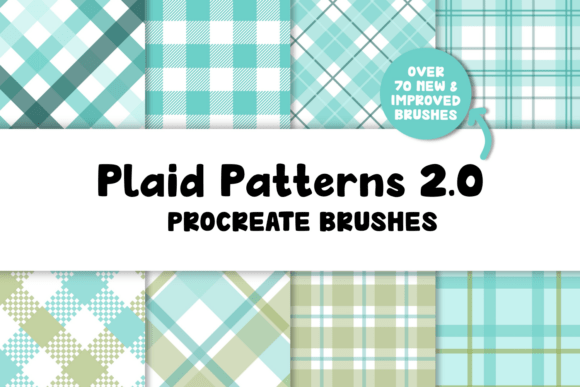
Plaid Patterns 2.0 is an all-in-one brush pack for Procreate that includes over 70 specialized brushes and 8 curated color palettes. It builds upon the original set with enhanced usability, more design flexibility, and added textures to give your plaids a polished, realistic finish. The brushes are organized into categories, making it easy to find what you need when you need it.
Why Use Plaid Patterns 2.0?
Designing plaids manually can be time-consuming and complex, especially if you're new to digital art or pattern creation. Plaid Patterns 2.0 simplifies the process by giving you ready-to-use brushes that handle the intricate details. Whether you're designing fabric swatches, holiday cards, or background textures for digital illustrations, this pack helps you achieve professional results quickly and efficiently.
Who Can Benefit From This Brush Set?
This brush pack is ideal for a wide range of users, including:
- Beginners who want to learn how to create patterns without the steep learning curve.
- Freelance designers looking to speed up their workflow for client projects.
- Small business owners creating custom designs for merchandise or branding.
- Educators teaching digital art or textile design concepts.
- Hobbyists who enjoy crafting and want to explore digital design.
What’s Included in the Pack?
Plaid Patterns 2.0 comes packed with a variety of tools and resources to support your creative process:
- 15 full plaid brushes – available in both single-color and multi-color versions.
- 2 simple plaid brushes – great for quick designs or layering.
- 4 texture stamps – add depth and realism to your patterns.
- 2 texture brushes – blend textures directly over your plaids.
- 8 color palettes – 4 bright and 4 muted options to suit different moods and themes.
- PDF user guide – step-by-step instructions for getting started.
- Brushset file – organized by category for easy access.
How to Use the Brushes
Using Plaid Patterns 2.0 is straightforward. Once imported into Procreate (version 5 or higher), you can select the plaid brush that matches your desired design. Each plaid is created in multiple steps, allowing you to layer different colors and adjust the pattern scale for a custom look. You can also apply texture brushes or stamps to enhance the tactile feel of your design.
For example, if you're designing a holiday card with a classic tartan pattern, you can start with a base plaid brush, then add a second color layer for contrast. After that, apply a texture stamp to give it a fabric-like finish. The included color palettes make it easy to choose hues that complement your overall design.
Real-World Uses for Plaid Patterns 2.0
Plaid designs are incredibly versatile and can be used in a variety of creative contexts:
- Product design – Create mockups for fabric prints, mugs, or phone cases.
- Graphic design – Use plaids as backgrounds or decorative elements in posters or social media graphics.
- Illustration – Add plaid clothing or textures to character illustrations.
- Marketing materials – Design seasonal banners or themed promotional assets.
- Teaching tools – Demonstrate pattern creation and color theory to students.
Beginner Tips for Best Results
If you're new to using pattern brushes, here are a few tips to help you get the most out of Plaid Patterns 2.0:
- Use layers – Separate your plaid colors onto different layers for easy editing.
- Experiment with scale – Adjust the brush size to change how the pattern appears.
- Try different palettes – Mix and match color swatches to find combinations you love.
- Combine textures – Layer texture brushes or stamps to add dimension.
Important Considerations
Before downloading and using Plaid Patterns 2.0, keep the following in mind:
- These brushes are only compatible with Procreate 5 or newer and won't work in other apps.
- The file size is approximately 57.7 MB, so ensure you have enough storage space on your iPad.
- Each brush is pre-configured for optimal performance, but you can adjust settings like opacity and flow to suit your style.
Getting Started
Once you've downloaded the brushset and color palettes, simply import them into Procreate using the app's import function. The included PDF guide walks you through the setup process and offers tips for customizing the brushes. From there, you're ready to start designing!
Final Thoughts
Plaid Patterns 2.0 for Procreate is more than just a set of brushes—it's a powerful tool that brings efficiency and creativity together. Whether you're creating seasonal illustrations, designing fabric patterns, or experimenting with digital textures, this pack gives you everything you need to bring your ideas to life. With its user-friendly design and thoughtful organization, it's a valuable addition to any Procreate artist's toolkit.