Procreate Card Making Kit for Beginners
Creating beautiful, personalized cards has never been easier thanks to the Procreate Card Making Kit for Beginner. Whether you're a total novice or a seasoned artist looking to explore digital design, this all-in-one kit offers a complete toolkit for crafting digital or printable greeting cards, gift tags, and envelopes. With step-by-step guidance, custom brushes, and ready-to-use templates, it’s the perfect way to dive into Procreate and bring your creative ideas to life.
What’s Inside the Kit?
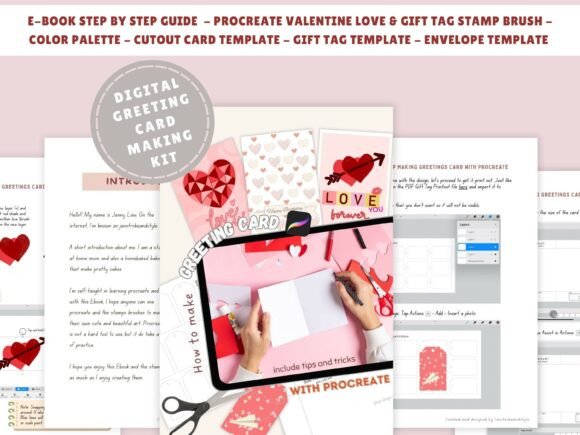
The Procreate Beginner Card Making Kit is packed with everything you need to start designing right away. The 54-page eBook walks you through the basics of using Procreate while guiding you through three unique greeting card designs and one gift tag project. You’ll also get access to:
- 102 Valentine Love Stamp brushes
- 24 Gift tag stamp brushes
- A custom color palette
- Printable cutout templates for cards, tags, and envelopes
- Procreate gesture tips and layering techniques
Why This Kit Works for Beginners
Learning a new creative app can feel overwhelming, but this Procreate tutorial for beginner is designed to make the process intuitive and enjoyable. Each section builds on the last, helping you develop confidence with tools like layers, brushes, and color selection. Even if you’ve never drawn digitally before, you’ll be able to follow along and create polished, professional-looking cards in no time.
The kit also includes downloadable templates, so you can focus on the design process without worrying about layout or sizing. Whether you're making cards for holidays, birthdays, or special events, this beginner-friendly system ensures you’ll always have a beautiful, personalized design ready to go.
Creative Possibilities with Procreate DIY Cards
Once you’ve mastered the basics, the creative potential of the Procreate Digital on iPad platform opens up. You’re not limited to the examples in the eBook—you can adapt the tools and techniques to suit your own style and needs. Here are just a few ways to explore beyond the starter projects:
- Customize for different occasions: Use the same templates to create cards for baby showers, weddings, graduations, and more.
- Experiment with brush styles: Mix and match the included brushes or try new ones to create unique textures and effects.
- Combine digital and physical: Print your designs and embellish them with real-world elements like ribbon, glitter, or pressed flowers.
- Make it a collaborative project: Share the templates with friends or family members and create group cards with multiple contributions.
How Different Users Can Benefit
This Procreate Beginner Card Making Kit is versatile enough to suit a wide range of users and goals. Here’s how different audiences can make the most of it:
- Bloggers and content creators: Use the cards as part of a creative lifestyle or craft blog post. Share your process and final designs to engage your audience.
- Small business owners: Design custom thank-you cards or promotional materials to send to clients or include with product shipments.
- Educators: Introduce students to digital art and design by incorporating the kit into a classroom or workshop setting.
- Hobbyists: Turn your creative time into meaningful, handmade gifts for friends and family.
Design Tips for Clear, Consistent Results
One of the biggest advantages of using Procreate is the ability to work non-destructively—meaning you can edit your layers, undo mistakes, and refine your design without starting over. To keep your work organized and your results professional, consider these practical tips:
- Use layers strategically: Keep text, background, and illustrations on separate layers so you can adjust each element independently.
- Stick to a cohesive color scheme: The included color palette is a great starting point, but feel free to explore complementary colors that match your theme.
- Keep text legible: Choose readable fonts and ensure there’s enough contrast between your text and background.
- Save variations: Duplicate your design file before making big changes so you can compare versions and choose the best one.
From Screen to Print: Bringing Your Cards to Life
While the Procreate Digital on iPad experience is fun and flexible, there’s something special about holding a physical card in your hands. The kit includes printable cutout templates, making it easy to turn your digital designs into tangible keepsakes. Just follow these steps:
- Export your design as a high-resolution PNG or PDF.
- Print on cardstock or heavy paper for durability.
- Cut along the template lines and fold as needed.
- Add final touches like ink outlines, stickers, or metallic pens for extra flair.
This process bridges the gap between digital and analog creativity, giving you the best of both worlds.
Getting the Most Out of Your Procreate Experience
The Procreate Beginner Card Making Kit is more than just a set of tools—it’s a gateway to a broader creative practice. As you become more comfortable with the app, you’ll start noticing how its features can be applied to other projects like illustrations, journaling, or even social media graphics. The skills you build while making cards will translate into confidence and versatility across your creative work.
And because everything is digital, you can experiment without limits. Try different compositions, color schemes, and brush effects without worrying about wasting materials. This freedom is especially valuable for beginners who are still finding their artistic voice.
Final Thoughts
Whether you're making cards for personal use or planning to share your creations more widely, the Procreate Card Making Kit for Beginner offers a smart, satisfying way to get started with digital design. It’s not just about making cards—it’s about building a creative habit, exploring your artistic side, and enjoying the process of learning something new. With clear instructions, beautiful tools, and plenty of room for customization, this kit is the perfect companion for anyone ready to bring their ideas to life on the iPad.